Handling Error - AADSTS75011
This document explains an issue encountered when an SSO application receives an authentication method which does not match those requested in the SAML RequestedAuthnContext.
End user experience
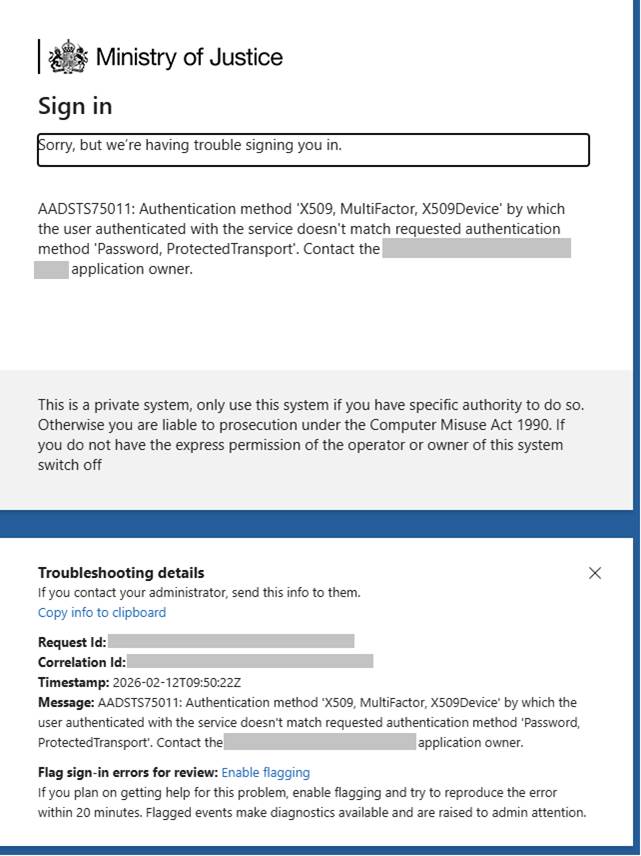
When an end user attempts to sign into a service and the authentication method supplied in the SAML response does not match the request, they will see the below error message:
“Error - AADSTS75011 Authentication method $receivedMethodType by which the user authenticated with the service doesn’t match requested authentication method $requestedMethodType. Contact the $appname application owner.”
Cause
Microsoft provide information about this error here: Error - AADSTS75011 Authentication method …
To summarise, this can occur when your app requests a method such as “Password” but receives an alternative authentication method such as an “X509” certificate or “FIDO”.
Example setup
Your app (SP, Service Provider) sends a SAML AuthNRequest including RequestedAuthnContext e.g. urn:oasis:names:tc:SAML:2.0:ac:classes:PasswordProtectedTransport
Entra (IdP, Identity Provider) acts as the evaluates the user’s current session. If that session was created with a different method (e.g. X590, FIDO etc), the requested context does not match the actual AuthnContext and Entra returns the error AADSTS75011.
Observed scenarios
This has specifically been observed and reported recently when users have enrolled and authenticated with WHfB (Windows Hello for Business) which is more secure than typical passwords.
Remediation
There are a couple of options to resolve this error which must be completed on the application side. IDAM recommend using Option 1 as this provides future proofing for any other authentication methods that may be employed in future.
Option 1: Remove the RequestedAuthnContext
This is typically an optional field, so by not requesting specific authentication contexts, your app will not be tied to specific authentication methods and add an element of future proofing.
Alternatively, you could set the RequestedAuthnContext to Unspecified
urn:oasis:names:tc:SAML:2.0:ac:classes:Unspecified
Option 2: Adjust RequestedAuthnContext to allow the X509 authentication methods
By adding urn:oasis:names:tc:SAML:2.0:ac:classes:X509 your app will accept authentication from X.509 certificates (such as WHfB uses).
Not recommended:
Option 3: Force re-auth
You could add forceAuthn=“true” to your AuthNRequest, so that Entra can honour the requested context, however this causes additional prompts for the user and lessens the SSO experience.